# Transfer d'un appel en avertissant un collègue

<span style="font-size: 16.0pt; line-height: 107%;">Comment mettre en attente et aussi comment mettre en attente et faire un appel pendant que la personne attend</span>

<span style="font-size: 14.0pt; line-height: 107%;">(Sur votre téléphone c’est possible que les boutons ne soient pas identiques, mais c’est le même principe)</span>

<span style="font-size: 14.0pt; line-height: 107%;"> </span>

<span style="mso-ignore: vglayout; position: relative; z-index: -1895797760;"><span style="left: 532px; position: absolute; top: -30px; width: 350px; height: 445px;">![Une image contenant texte, Appareil électronique, gadget, multimédia

Description générée automatiquement](file:///C:/Users/Dave/AppData/Local/Packages/oice_16_974fa576_32c1d314_bba/AC/Temp/msohtmlclip1/01/clip_image002.jpg)</span></span>

<span style="font-size: 12.0pt; line-height: 107%;"> </span>

**<span style="font-size: 28.0pt; line-height: 107%;">Transférer en avertissant votre collègue</span>**<span style="font-size: 14.0pt; line-height: 107%;">  
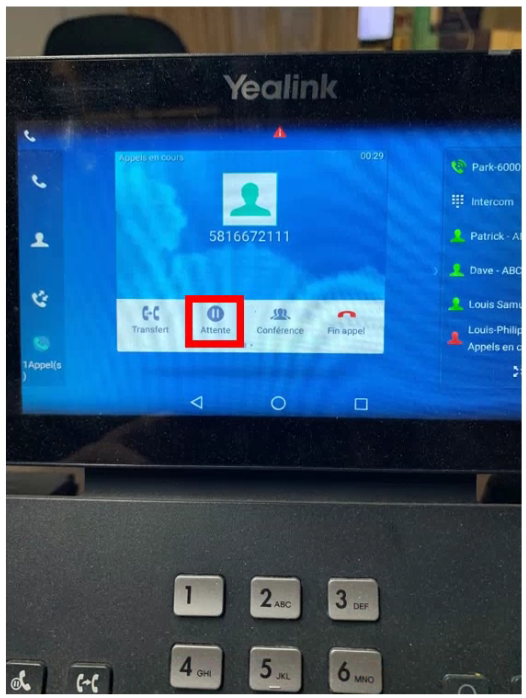
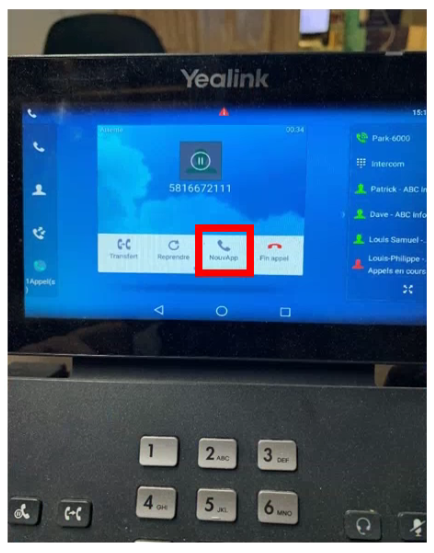
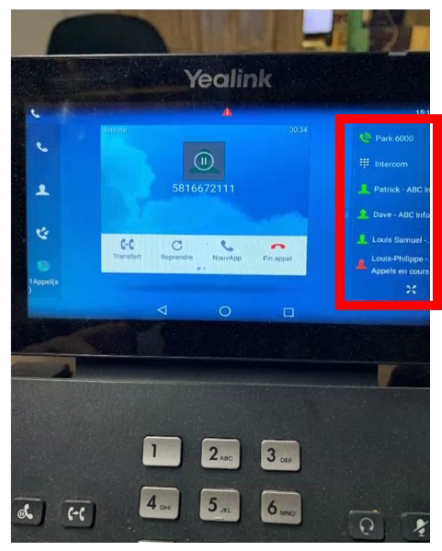
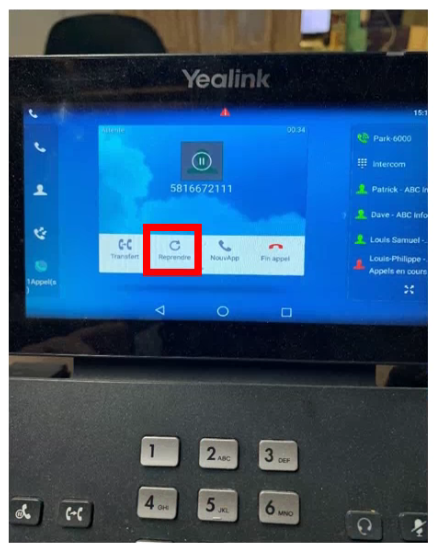
(Décrocher le téléphone pesez sur **Attente** – Ensuite sur **nouvel appel** choisir votre collègue pour l’avertir ensuite pesez sur **REPRENDRE** et pesez sur **TRANSFERT** en choisissant le nom de votre collègue)</span>

<span style="font-size: 14.0pt; line-height: 107%;"> </span>

<span style="font-size: 14.0pt; line-height: 107%;"> </span>

<span style="font-size: 14.0pt; line-height: 107%;">Pour **mettre en attente** juste besoin d’appuyer sur **ATTENTE**</span>

<span style="mso-ignore: vglayout; position: absolute; z-index: 251674624; left: 0px; margin-left: 641px; margin-top: 240px; width: 50px; height: 45px;">  
</span>

[![image.png](http://aide.alliancetelecom.ca/uploads/images/gallery/2024-07/scaled-1680-/CEcimage.png)](http://aide.alliancetelecom.ca/uploads/images/gallery/2024-07/CEcimage.png)

<span style="font-size: 16.0pt; line-height: 107%; mso-no-proof: yes;"><span style="mso-spacerun: yes;"> </span></span><span style="font-size: 16.0pt; line-height: 107%;">  
  
</span>

<span style="mso-ignore: vglayout; position: absolute; z-index: 251641344; left: 0px; margin-left: 463px; margin-top: 550px; width: 14px; height: 13px;">![](file:///C:/Users/Dave/AppData/Local/Packages/oice_16_974fa576_32c1d314_bba/AC/Temp/msohtmlclip1/01/clip_image008.png)</span>

<span style="font-size: 16.0pt; line-height: 107%;">Pesez sur **Nouvel Appel**</span>

<span style="font-size: 14.0pt; line-height: 107%;"> </span>[![image.png](http://aide.alliancetelecom.ca/uploads/images/gallery/2024-07/scaled-1680-/RtHimage.png)](http://aide.alliancetelecom.ca/uploads/images/gallery/2024-07/RtHimage.png)

<span style="font-size: 14.0pt; line-height: 107%;">Choisir la personne à avertir</span>

<span style="font-size: 14.0pt; line-height: 107%;"> </span>

[![image.png](http://aide.alliancetelecom.ca/uploads/images/gallery/2024-07/scaled-1680-/mQximage.png)](http://aide.alliancetelecom.ca/uploads/images/gallery/2024-07/mQximage.png)

<span style="font-size: 14.0pt; line-height: 107%;"> </span>

<span style="font-size: 14.0pt; line-height: 107%;"> </span>**<span style="font-size: 14.0pt; line-height: 107%;">Reprendre</span>**<span style="font-size: 14.0pt; line-height: 107%;"> l’appel pour avertir la personne qu’elle sera transférée</span>

[![image.png](http://aide.alliancetelecom.ca/uploads/images/gallery/2024-07/scaled-1680-/REBimage.png)](http://aide.alliancetelecom.ca/uploads/images/gallery/2024-07/REBimage.png)

<span style="font-size: 14.0pt; line-height: 107%;"> </span>

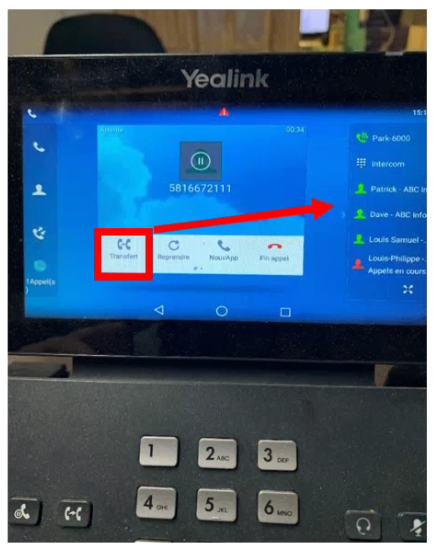
<span style="font-size: 14.0pt; line-height: 107%;"> </span><span style="font-size: 14.0pt; line-height: 107%;">Pesez sur **TRANSFERT** et choisir votre collègue </span>

<span style="font-size: 14.0pt; line-height: 107%;"> </span>

[![image.png](http://aide.alliancetelecom.ca/uploads/images/gallery/2024-07/scaled-1680-/UdGimage.png)](http://aide.alliancetelecom.ca/uploads/images/gallery/2024-07/UdGimage.png)

<span style="font-size: 12.0pt; line-height: 107%;"></span>